
This article targets the current Solid 2.0 beta APIs as of beta.14. Some APIs may evolve before stable release.
Overview
Today we’ll explore many of the new concepts introduced in Solid 2.0 by building a real application. The application has a left hand column that lists issues, and a right-hand column that shows the currently selected issue and its details. The app itself is intentionally simple, but it gives us room to explore how the new primitives compose together.
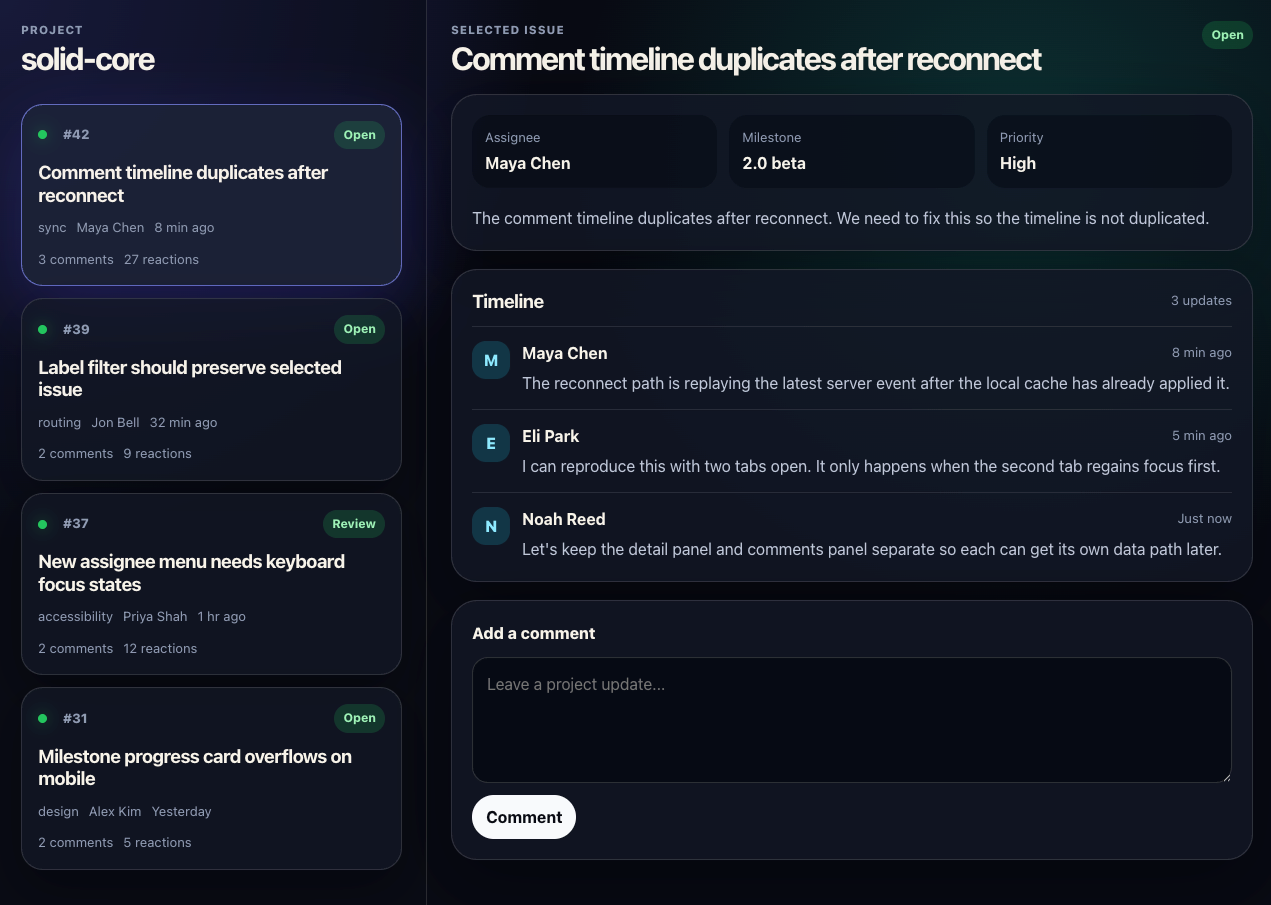
Before we begin, it’s worth noting that Solid 2.0 is currently in beta so there will be bugs but I think the model itself is pretty stable at the moment.
You can view this GitHub repo for our starting point with static data. If you are in a rush you can also find the finished product here.
Now for a quick tour. It’s a basic scaffolded app using Vite and the Solid beta.
// package.json
{
  "name": "solid-2-issue-tracker",
  "private": true,
  "version": "0.0.0",
  "type": "module",
  "scripts": {
    "dev": "vite",
    "build": "tsc -b && vite build",
    "preview": "vite preview"
  },
  "dependencies": {
    "@solidjs/web": "2.0.0-beta.14",
    "solid-js": "2.0.0-beta.14",
    "vite-plugin-solid": "3.0.0-next.5"
  },
  "devDependencies": {
    "typescript": "~5.8.3",
    "vite": "^8"
  }
}
In the source folder there is a data.ts file which contains all our hardcoded issues and comments as well as their respective types.
api.ts is another file of interest as it provides these static variables through a fake api with some small delays to simulate things being async.
Now lets take a look at the 3 most important files.
// App.tsx
import { DetailPanel } from "./components/DetailPanel";
import { IssueColumn } from "./components/IssueColumn";
import { issues } from "./data";

import "./App.css";

export default function App() {
  return (
    <main class="app-shell">
      <IssueColumn issues={issues} />
      <DetailPanel issue={issues[0]} />
    </main>
  );
}
Nothing too exciting here yet. We just pass our UI our static list of issues, and default the DetailPanel to be the first issue.
// components/IssueColumn.tsx
import { For } from "solid-js";
import type { Issue } from "../data";

type IssueColumnProps = {
  issues: readonly Issue[];
};

export function IssueColumn(props: IssueColumnProps) {
  return (
    <section class="issue-column" aria-label="Issues">
      <header class="toolbar">
        <div>
          <p class="eyebrow">Project</p>
          <h2>solid-core</h2>
        </div>
      </header>

      <div class="issue-list">
        <For each={props.issues}>{issue => <IssueCard issue={issue} />}</For>
      </div>
    </section>
  );
}

function IssueCard(props: { issue: Issue }) {
  return (
    <article
      class={"issue-card"}
      onClick={() => {}}
      style={{ cursor: "pointer", opacity: 1 }}
    >
      <div class="issue-card-header">
        <span class="status-dot" aria-hidden="true" />
        <span class="issue-number">#{props.issue.id}</span>
        <span class="issue-status">{props.issue.status}</span>
      </div>
      <h3>{props.issue.title}</h3>
      <div class="issue-meta">
        <span>{props.issue.area}</span>
        <span>{props.issue.author}</span>
        <span>{props.issue.updated}</span>
      </div>
      <div class="issue-stats" aria-label="Issue activity">
        <span>{props.issue.comments} comments</span>
        <span>{props.issue.reactions} reactions</span>
      </div>
    </article>
  );
}
Again IssueColumn is simply UI with no actual state attached. Most notably it uses the For component to loop over the array of issues rendering an IssueCard for each.
// components/DetailPanel.tsx
import { createSignal, For } from "solid-js";
import { commentsByIssueId, type Comment, type Issue } from "../data";

export function DetailPanel(props: { issue: Issue }) {
  return (
    <section class="detail-panel" aria-label="Selected issue details">
      <IssueHeader issue={props.issue} />
      <IssueSummary issue={props.issue} />
      <div style={{ opacity: 1 }}>
        <Timeline
          issue={props.issue}
          comments={commentsByIssueId[props.issue.id] ?? []}
        />
      </div>
      <CommentComposer />
    </section>
  );
}

function IssueHeader(props: { issue: Issue }) {
  return (
    <header class="detail-header">
      <div>
        <p class="eyebrow">Selected Issue</p>
        <h2>{props.issue.title}</h2>
      </div>
      <span class="pill">{props.issue.status}</span>
    </header>
  );
}

function IssueSummary(props: { issue: Issue }) {
  return (
    <div class="summary-card">
      <div class="summary-grid">
        <div>
          <span>Assignee</span>
          <strong>{props.issue.assignee}</strong>
        </div>
        <div>
          <span>Milestone</span>
          <strong>{props.issue.milestone}</strong>
        </div>
        <div>
          <span>Priority</span>
          <strong>{props.issue.priority}</strong>
        </div>
      </div>
      <p>{props.issue.description}</p>
    </div>
  );
}

function Timeline(props: { issue: Issue; comments: readonly Comment[] }) {
  return (
    <section class="timeline" aria-labelledby="timeline-heading">
      <div class="section-heading">
        <h3 id="timeline-heading">Timeline</h3>
        <span>{props.comments.length} updates</span>
      </div>
      <For each={props.comments}>
        {comment => <CommentCard comment={comment} />}
      </For>
    </section>
  );
}

function CommentCard(props: { comment: Comment }) {
  return (
    <article class="comment-card">
      <div class="avatar" aria-hidden="true">
        {props.comment.author.charAt(0)}
      </div>
      <div>
        <div class="comment-heading">
          <strong>{props.comment.author}</strong>
          <span>{props.comment.time}</span>
        </div>
        <p>{props.comment.body}</p>
      </div>
    </article>
  );
}

function CommentComposer() {
  const [comment, setComment] = createSignal("");
  const submitComment = () => {
    console.log("submitting");
  };

  return (
    <form
      class="composer"
      onSubmit={e => {
        e.preventDefault();
        submitComment();
      }}
    >
      <label for="comment">Add a comment</label>
      <textarea
        id="comment"
        rows="4"
        placeholder="Leave a project update..."
        value={comment()}
        onInput={e => setComment(e.target.value)}
        onKeyDown={e => {
          if (e.key === "Enter" && !e.shiftKey) {
            e.preventDefault();
            submitComment();
          }
        }}
      />
      <div class="composer-actions">
        <button type="submit">Comment</button>
      </div>
    </form>
  );
}
A little bit more going on here, but mainly just scaffolding some UI to handle when we add a comment. Right now it is just logging in the console.
Now that that’s all out of the way we can get to the interesting parts.
Intro to Solid 2.0’s Async Mental Model
One of the biggest changes in Solid 2.0 is that async work is now deeply integrated into rendering itself.
In Solid 1.x, async data typically lived outside the reactive graph through primitives like createResource. In Solid 2.0, async computations can participate directly in rendering.
That means things like memos can now suspend:
// Promise<Issue[]> -> Accessor<Issue[]>
const issues = createMemo(getIssues);
At first glance this might look a little strange.
getIssues is async, but issues() is not a Promise. Instead, Solid tracks the asynchronous dependency automatically and suspends rendering until the data is ready.
So from the component’s perspective: issues() already behaves like resolved data.
This is one of the biggest conceptual shifts in Solid 2.0. Async values can now flow directly through the reactive graph instead of needing separate async primitives.
This also means updates are no longer always immediate.
Solid 2.0 prefers consistency over tearing. Instead of partially updating the UI while async dependencies are still loading, Solid coordinates updates together through transitions.
This model can feel surprising at first, but it enables much smoother async workflows once the pieces start fitting together.
Now that thats out of the way, let’s see how to use it in practice.
Getting Async Data
So the first thing you have to do in any app is make an api call, or at least do something async. Hardcoded variables don’t get us very far.
Let’s switch our app to use our dummy apis.
// App.tsx
import { createMemo } from "solid-js";
import { getIssues } from "./api";

export default function App() {
  const issues = createMemo(getIssues);

  return (
    <main class="app-shell">
      <IssueColumn issues={issues()} />
      <DetailPanel issue={issues()[0]} />
    </main>
  );
}
That was easy! Just pass our async function to createMemo and Solid knows what to do with it.
Passing async to
createMemois similar in functionality to a past api calledcreateAsync
Now do the same thing for the comments.
// components/DetailPanel.tsx
export function DetailPanel(props: { issue: Issue }) {
  const comments = createMemo(() => getComments(props.issue.id));

  return (
    <section class="detail-panel" aria-label="Selected issue details">
      <IssueHeader issue={props.issue} />
      <IssueSummary issue={props.issue} />
      <div style={{ opacity: 1 }}>
        <Timeline issue={props.issue} comments={comments()} />
      </div>
      <CommentComposer />
    </section>
  );
}
Loading Boundaries
You’ll notice one thing that isn’t the greatest. We see a blank page until all the async is resolved. In our case that’s about one second.
In this case I think I will choose to make the page wait for the issue list before showing since its pretty fast and maybe just “unblock” the async for the comments.
So what does “unblock” the async mean. It essentially means that we will allow the outer page to render before the comments are ready and instead show a fallback.
// components/DetailPanel.tsx
export function DetailPanel(props: { issue: Issue }) {
  const comments = createMemo(() => getComments(props.issue.id));

  return (
    <section class="detail-panel" aria-label="Selected issue details">
      <IssueHeader issue={props.issue} />
      <IssueSummary issue={props.issue} />
      <Loading
        fallback={
          <LoadingState
            label="Loading comments"
            detail="Preparing the timeline."
          />
        }
      >
        <div style={{ opacity: 1 }}>
          <Timeline issue={props.issue} comments={comments()} />
        </div>
      </Loading>
      <CommentComposer />
    </section>
  );
}
Where we put this Loading matters a great deal. We want to put it as low as possible allowing things like the IssueHeader and IssueSummary to show even before the comments are ready.
Solid knows that where we read comments() is the main thing to consider. It will fallback as expected even though we define the comments memo higher up.
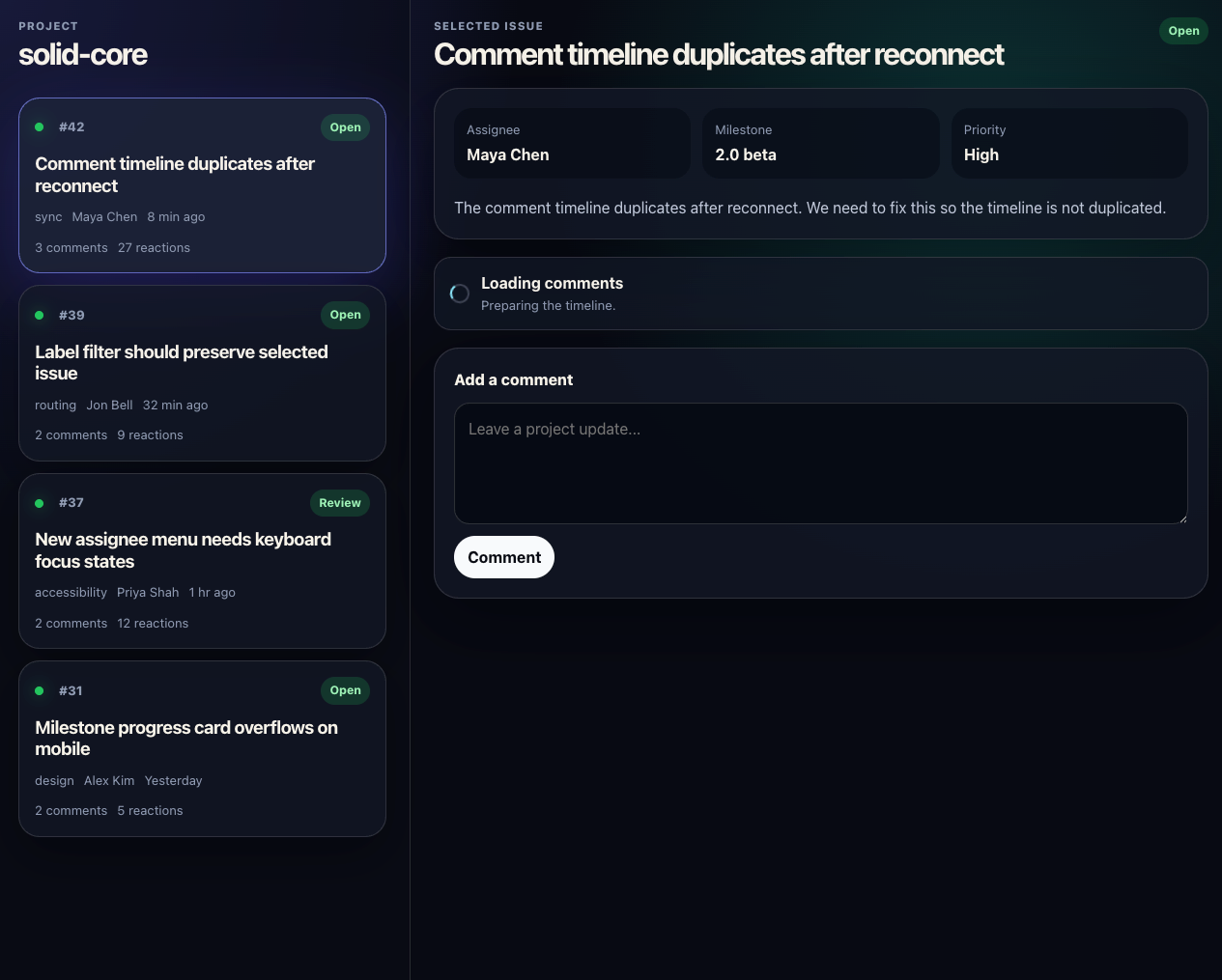
Setting State (Select Issue)
So we have the data loading, but we can’t click on an issue and have the DetailPanel show. Let’s implement that now.
export default function App() {
  const issues = createMemo(getIssues);

  const [selectedIssue, setSelectedIssue] = createSignal(() => issues()[0]);

  const selectIssue = (issue: Issue) => {
    setSelectedIssue(issue);
  };

  return (
    <main class="app-shell">
      <IssueColumn
        issues={issues()}
        selectedIssue={selectedIssue()}
        selectIssue={selectIssue}
      />
      <DetailPanel issue={selectedIssue()} />
    </main>
  );
}
So here we’ve given ourselves a way to select an issue and pass that down to the column. We also now pass the selectedIssue to the DetailsPanel instead of always the first one.
There is another subtle but important Solid 2.0 detail.
Notice we are passing a function into createSignal instead of the value directly.
If we wrote:
createSignal(issues()[0]);then the signal would only capture the current value once during initialization.
By passing a function instead:
() => issues()[0];the signal tracks issues() reactively. That means once the async issues list resolves, selectedIssue() will automatically point at the first issue.
This becomes especially important when signals depend on async reactive values.
Now in IssueColumn update the For:
<For each={props.issues}>
  {issue => (
    <IssueCard
      issue={issue}
      selectedIssue={props.selectedIssue}
      selectIssue={props.selectIssue}
    />
  )}
</For>
and the IssueCard:
function IssueCard(props: {
  issue: Issue;
  selectedIssue: Issue;
  selectIssue: (issue: Issue) => void;
}) {
  return (
    <article
      class={
        props.selectedIssue.id === props.issue.id
          ? "issue-card active"
          : "issue-card"
      }
      onClick={() => props.selectIssue(props.issue)}
      style={{ cursor: "pointer", opacity: 1 }}
    >
      <div class="issue-card-header">
        <span class="status-dot" aria-hidden="true" />
        <span class="issue-number">#{props.issue.id}</span>
        <span class="issue-status">{props.issue.status}</span>
      </div>
      <h3>{props.issue.title}</h3>
      <div class="issue-meta">
        <span>{props.issue.area}</span>
        <span>{props.issue.author}</span>
        <span>{props.issue.updated}</span>
      </div>
      <div class="issue-stats" aria-label="Issue activity">
        <span>{props.issue.comments} comments</span>
        <span>{props.issue.reactions} reactions</span>
      </div>
    </article>
  );
}
Basically we’ve just wired up the click, as well as set the active state based on which issue is active.
Try it out. It works!!
Well… kinda.
Why does clicking an issue take some time before anything updates?
This is probably the biggest WTF moment when first using Solid 2.0. Updates can take time because transitions are now part of the default rendering model.
If you’re coming from React, Vue, Solid 1.x, or really most frontend frameworks, your instinct is probably something like this:
- User clicks issue
- Selected issue updates immediately
- Comments load afterwards
That approach feels instant, but it can also create inconsistent intermediate states.
For example:
the issue title may already show the new issue while the comments still belong to the previous issue or parts of the UI update at different times
This is commonly referred to as tearing.
Solid 2.0 instead favors consistency. Async dependencies participate directly in rendering, allowing Solid to coordinate updates together through transitions.
So in our example, the flow actually looks more like this:
- User clicks issue
- Solid begins a transition
getCommentsresolves- The UI commits together consistently
This means the UI stays internally consistent, but it also means updates are not always instantaneous by default.
In our case, waiting for the comments before showing anything probably is not the ideal UX. Luckily Solid gives us some tools to show affordances.
We have two different approaches we can try.
Loading (on prop)
So by default Solid 2.0 doesn’t go back to fallback. As mentioned earlier Loading is for initial load, but in this case we might want to “unblock” the async on update.
We can do this with the on prop of Loading. Change the Loading in the DetailsPanel to
<Loading
  fallback={
    <LoadingState label="Loading comments" detail="Preparing the timeline." />
  }
  on={props.issue.id}
>
  <div style={{ opacity: 1 }}>
    <Timeline issue={props.issue} comments={comments()} />
  </div>
</Loading>
It basically says every time the props.issue.id changes go to the fallback and allow the update to complete early.
Now if you test it the active card highlights instantly as well as IssueHeader and IssueSummary and just the comments take time.
isPending
So this is one experience we can offer but another option is to use isPending to show an affordance. Let’s revert the on prop change and do something a little different.
Let’s make the DetailPanel fade out when we are in the process of selecting an issue. It’s as simple as using isPending.
<section
  class="detail-panel"
  aria-label="Selected issue details"
  style={{ opacity: isPending(() => props.issue) ? 0.5 : 1 }}
>
  {/* ... */}
</section>
This seems just too easy! We already have access to props.issue which is our selectedIssue signal. So it only makes sense to ask if it’s pending.
You can be more creative and use isPending in other areas. For example I played with adding a fade out also to the IssueCard
<article
  style={{
    opacity:
      props.selectedIssue.id === props.issue.id &&
      isPending(() => props.selectedIssue)
        ? 0.5
        : 1,
  }}
>
  {/* ... */}
</article>
Is there another affordance you’d like you try? Give it a shot!
Actions
So are you having fun yet? We are just getting to the real interesting part so buckle up.
So let’s implement the typical way to add a comment by just using a click handler (no action), and see the downsides.
In DetailsPanel edit CommentComposer to call into our addComment api function.
function CommentComposer(props: {
  handleAddComment: (comment: string) => void;
}) {
  const [comment, setComment] = createSignal("");

  const submitComment = async () => {
    const body = comment().trim();
    if (!body) return;
    props.handleAddComment(body);
  };

  <form
    class="composer"
    onSubmit={e => {
      e.preventDefault();
      submitComment();
    }}
  >
    {/* ... */}
  </form>;
}
Also in DetailsPanel add the handleAddComment and pass it down:
export function DetailPanel(props: { issue: Issue }) {
  const comments = createMemo(() => getComments(props.issue.id));

  const handleAddComment = async (comment: string) => {
    await addComment(props.issue.id, comment);
    refresh(comments);
  };

  return (
    <section
        class="detail-panel"
        aria-label="Selected issue details"
        style={{ opacity: isPending(() => props.issue) ? 0.5 : 1 }}>
        {/* ... */}
        <CommentComposer handleAddComment={handleAddComment} />
    </section>;
  )
}
So when you go to test it the first thing you notice is that it almost appears stuck. Like did my addComment fire at all? Let’s add an isPending check. We will need to pass the comments down as well.
<button type="submit">
  {isPending(() => props.comments) ? "Adding..." : "Comment"}
</button>
So you might think the job is done but we’ve still got far to go. None of this really did what we wanted did it? Here are just two quick flaws I found:
- The
isPendingonly triggers on the actually refresh of comments. We want a loading state much earlier than this. Like immediately when you click the button and before you even run the action - If you submit multiple comments quickly they pop in one by one instead of doing one commit with all of them combined. This makes for a jarring UI
So what do we do then? Solid doesn’t leave us hanging here and provides us two more tools which are actions and optimistic state. We can use these two in combination to create exactly the affordance we want.
We need a way to tie the refresh together with the addComment api call. This is exactly the purpose of actions. Make our handleAddComment look something like this:
const handleAddComment = action(function* (comment: string) {
  yield addComment(props.issue.id, comment);
  refresh(comments);
});
This might look a bit exotic since it uses generators, but the idea is actually fairly straightforward.
By yielding the async work:
yield addComment(props.issue.id, comment);Solid is able to keep both the mutation and the refresh inside the same transition.
Instead of treating the addComment api call and the refresh(comments) as two unrelated async operations, Solid coordinates them together as one logical update.
const handleAddComment = action(function\* (comment: string) {
    yield addComment(props.issue.id, comment);
    refresh(comments);
});
This means the UI can stay internally consistent throughout the entire flow.
It also solves issue #2 mentioned above. If you submit multiple comments quickly, the updates are grouped together instead of committing one-by-one and causing a jarring UI.
But we still haven’t solved issue #1.
Right now the user still doesn’t get immediate feedback when they click “Comment”. What we really want is a way to immediately reflect user intent before the server roundtrip completes.
This is exactly where optimistic state comes in.
Optimistic State
So optimistic state allows you to show something temporary while a transition is happening and then it will revert afterwards. Let’s get rid of our isPending on the form and do something different.
The easiest form of optimistic state is just a boolean true or false. Add this to CommentComposer:
const [addCommentPending, setAddCommentPending] = createOptimistic(false);

const submitComment = async () => {
  setAddCommentPending(true);
  const body = comment().trim();
  if (!body) return;
  props.handleAddComment(body);
};

<button type="submit" disabled={addCommentPending()}>
  {addCommentPending() ? "Adding..." : "Comment"}
</button>;
Now when you hit add it will disable the button and change the text giving some feedback to the user that something is happening.
We have solved the two major problems identified before but we can take it even further.
Optimistic Store
Right now we have to wait for our comment to show. Our API being slow shouldn’t make the UI feel slow. Let’s make our comments show up immediately and then sync in the background.
createOptimisticStore is the tool for this job. Let’s undo our createOptimistic boolean as we will just make things appear instant so there is no need for it. You can spam multiple comments super fast and we don’t want to stop them.
In DetailPanel change our comments memo to this:
const [optimisticComments, setOptimisticComments] = createOptimisticStore(
  () => getComments(props.issue.id),
  []
);

const handleAddComment = action(function* (comment: string) {
  setOptimisticComments(comments => {
    comments.push({ author: "Brenley Dueck", body: comment });
  });
  yield addComment(props.issue.id, comment);
  refresh(optimisticComments);
});
You will also need to remember to use optimisticComments instead of comments in the JSX.
So this primitive is doing a lot of heavy lifting for us. Let me try and explain it.
First of all the source of this optimistic state is our getComments. This is the source of truth from the server. When we refresh it will call this function and actually diff with whats already in the state with the source of truth.
Second of all we push our optimistic comment into the store as the first thing inside the action. Remember everything inside the action is tied together. This optimistic comment only lives as long until the transition ends and we return back from the server.
Third of all I used the optional time field as an indication the save is in progress. Then I can do something like this:
<span>{props.comment.time ?? "Saving..."}</span>This is a super brief explanation but hopefully gets the point across how powerful it is.
Now everything feels super quick even though it takes some time to save. The ideal user experience.
Optimistic Issue Column Count
So I thought this is where I would end things, but ended up noticing one thing that wasn’t quite right. When I optimistically add comments the comment number goes up the DetailsPanel but not the IssueColumn.
This threw a bit of a wrench in things and made me think how to accomplish this. I’m not sure if its the best solution but it seems to work. I basically composed actions by calling one in another.
export function DetailPanel(props: {
  issue: Issue;
  saveCommentAction: (issueId: number, comment: string) => Promise<unknown>;
}) {
  const addCommentAction = action(function* (comment: string) {
    setOptimisticComments(comments => {
      comments.push({ author: "Brenley Dueck", body: comment });
    });
    yield props.saveCommentAction(props.issue.id, comment);
    refresh(optimisticComments);
  });
}
Then in the parent I passed its own action which handles updating the number of comments optimistically as well. This was needed because the state is in two different places.
export default function App() {
  const [issues, setIssues] = createStore(getIssues, []);
  const [optimisticCommentCount, setOptimisticCommentCount] = createOptimistic(() => selectedIssue().comments);

  const getCommentCount = (issue: Issue) => {
    return selectedIssue().id === issue.id ? optimisticCommentCount() : issue.comments;
  }

  const saveCommentAction = action(function* (issueId: number, comment: string) {
    setOptimisticCommentCount(commentCount => commentCount + 1);

    const comments = yield addComment(issueId, comment);

    setIssues(issues => {
      const issue = issues.find(i => i.id === issueId);
      if (issue) {
        issue.comments = comments.length;
      }
    });
  });
∂∂
  return (
    <main class="app-shell">
      <IssueColumn issues={issues} selectedIssue={selectedIssue()} selectIssue={selectIssue} getCommentCount={getCommentCount} />
      <Loading fallback={<LoadingState label="Loading issue" detail="Opening the selected issue." />}>
        <DetailPanel issue={selectedIssue()} saveCommentAction={saveCommentAction} />
      </Loading>
    </main>
  )
}
Since we can only add comments to the selectedIssue I use that as the optimistic state when applicable via getCommentCount.
I know I went fast in this last section but it was more of a bonus section, maybe I should have had you try to implement it yourself since its a bit tricky.
Conclusion
The biggest shift in Solid 2.0 isn’t a single API — it’s that async is now deeply integrated into the rendering model itself.
Once you stop thinking of async work as something “outside” rendering, many of these primitives start fitting together naturally.
So that was a lot of info but I hoped you learned something and are excited to try out Solid 2.0. It can take awhile to get your head around all these new concepts, even I sometimes struggle and I follow things pretty closely.
Until next time.